This article is about turning a Raspberry Pi 4 into something closer to an appliance than a standard computer: having the operating system read-only, updating it remotely, and automatically returning to the last working version if it fails to boot.
This is useful for machines that are expected to run unattended. Instead of modifying the installed system file by file, we want deployments to be reproducible and updates to be atomic: after a reboot, the machine should either run the complete new system, or fall back to the previous one.
An immutable system runs from a read-only filesystem: the system cannot modify itself, state persists in one place, and an update does not patch anything in place. An update is a second, complete copy of the system, written in a different partition, then switched to on the next boot. Every device runs an identical image, and you always know what is on it. This is usually how routers, for example, are built.
Concretely, we want:
- A read-only system, with writable state confined to
/var. - A disk image written to a card once, no install step.
- A/B updates fetched over the network, applied atomically.
- Automatic rollback when a new version fails to boot.
All four come from holy systemd:
systemd-repart builds the disk image at build time
and grows partitions on first boot,
systemd-sysupdate downloads and applies the A/B updates,
systemd-boot boots the system and counts boot attempts,
and rollbacks are implemented using this counter.
This article started as a port: Julian Stecklina built the same A/B logic in QEMU on x86 (x86.lol). This article ports it to a Raspberry Pi 4, which forces a detour through UEFI, and fills in its missing pieces.
Prerequisites
This article assumes that you are already comfortable with:
- basic Linux concepts such as partitions, filesystems and the boot process
- basic NixOS configuration and Nix module syntax
No previous knowledge of systemd-repart, systemd-sysupdate,
UKIs or UEFI on Raspberry Pi is required: those will be introduced as we use them.
To reproduce the setup, you will need:
- A Raspberry Pi 4, with an >8GiB SD card (the image is about 5.3 GiB raw)
- A USB-TTL serial cable for the UART console
- Nix with flakes
Note: Throughout this article, I’m highlighting some configuration snippets. Every snippet below is a trimmed version of the full configuration from: https://github.com/ldryt/immutable-pi4
UEFI on a Raspberry Pi?
systemd-boot, unified kernel images (UKIs), and systemd-sysupdate
all assume a standard PC:
UEFI firmware, an EFI System Partition (ESP),
the Boot Loader Specification (BLS), NVRAM for EFI variables.
A UKI bundles the Linux kernel, its initial RAM filesystem (initrd),
and the kernel command line into a single EFI executable.
Here, systemd-boot loads that file to start the corresponding system version.
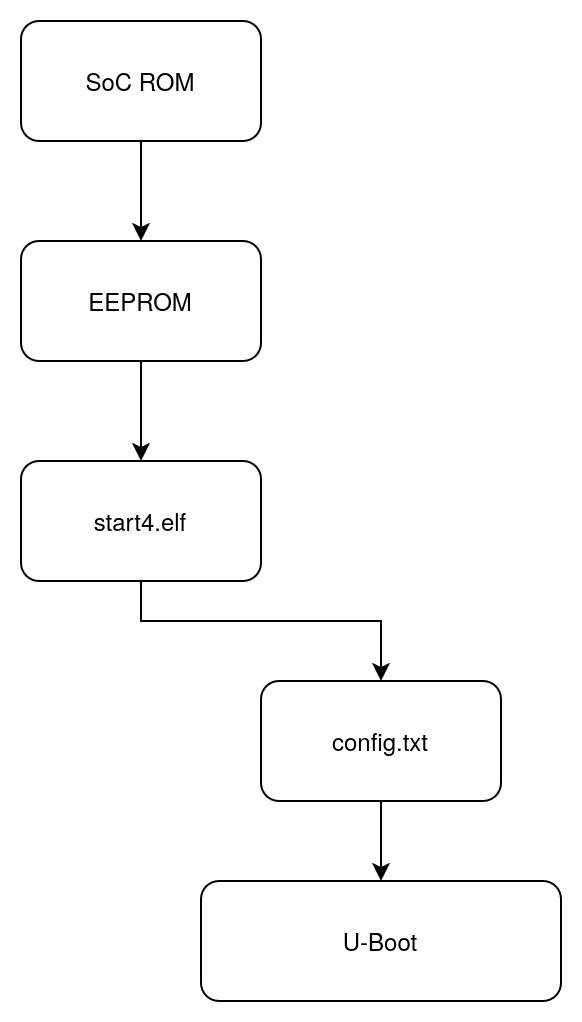
An RPi, however, has its specific boot chain:
the SoC ROM reads the EEPROM,
the EEPROM finds a FAT partition and loads start4.elf,
start4.elf reads config.txt, and control usually passes to U-Boot.
There is no ESP in the BLS sense, no \EFI\Linux, no NVRAM,
and systemd assumes there is. We need to change the end of the boot chain.
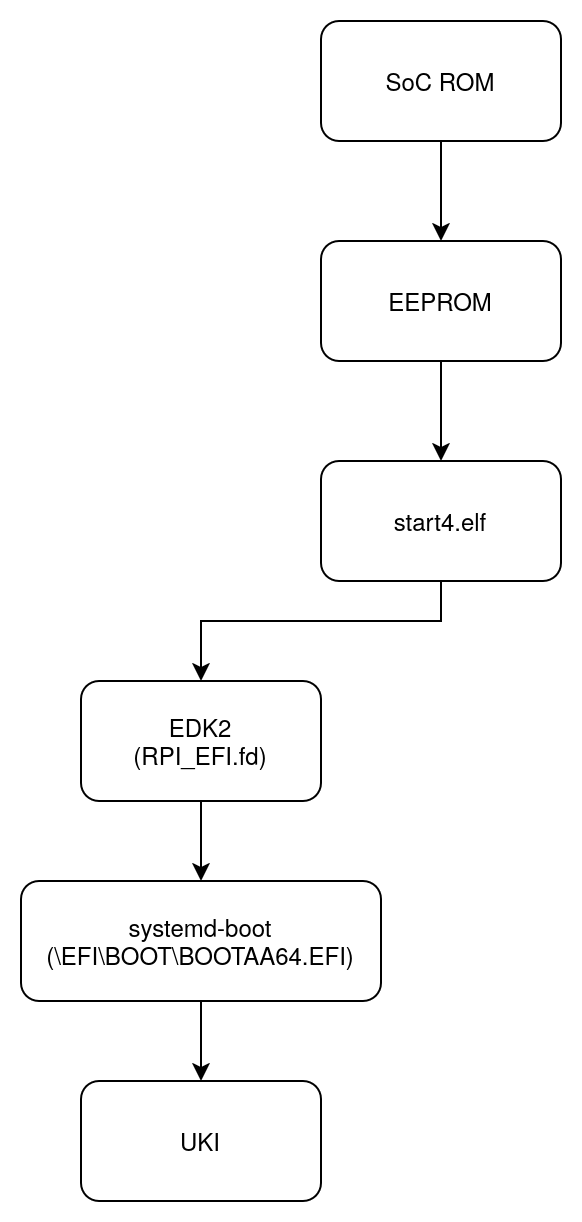
pftf/RPi4 changes that:
it packages the EDK2 (Tianocore) UEFI firmware
as a set of files copied onto the boot partition,
and start4.elf loads it instead of U-Boot.
Note: this is not restricted to the Pi 4: pftf started on the Pi 3 (pftf/RPi3), and the Pi 5 has its own EDK2 port (worproject/rpi5-uefi). The systemd side of this article applies to any machine that boots through UEFI.
Now, the end of the boot chain is compatible with the systemd tools.
The difference is the NVRAM:
a standard PC would keep its boot entries there and pick from them,
an RPi has none, so we reach systemd-boot
through the fixed fallback file \EFI\BOOT\BOOTAA64.EFI,
which needs no stored state.
Keep that in mind for later, it decides how far rollbacks can go.
You will need to modify some UEFI settings on first boot:
Device Manager -> Raspberry Pi Configuration -> Advanced Configuration -> System Table Selection: switch to Device Tree (SD controller not available with ACPI)Boot Maintenance Manager -> Boot Options -> Change Boot Order: SD/MMC needs to be first (avoids a 20s wait)
Note: these settings are stored in
RPI_EFI.fdon the ESP. They persist on reboots, but not a re-flash of the ESP (they are not your typical EFI variables)
Note:
systemd-repartproduces a GPT disk, only recent EEPROM releases read GPT directly. You may need tosudo rpi-eeprom-update -afirst (See https://github.com/raspberrypi/rpi-eeprom).
With no NVRAM, EFI variables written at runtime do not persist,
the firmware fakes them by rewriting RPI_EFI.fd on the FAT,
and that only works before the OS owns the SD controller,
so runtime modification of EFI variables should not work
(pftf#6,
pftf#136)
Note: I had to disable the vc4 GPU driver DMA controller does not probe against the firmware device tree:
bcm2835-dma fe007000.dma: probe ... failed with error -12 (ENOMEM)so there are no DMA channels. vc4 HDMI audio then asks for one it can never get, its probe keeps deferring with -EPROBE_DEFER (-517), and spam:vc4_hdmi fef00700.hdmi: Could not register PCM component: -517
Immutable image, with repart
systemd-repart builds a GPT image from a declarative description:
it takes a list of each partition, and it writes the .raw at build
time.
The same tool runs in the initrd, to grow or add partitions.
Four partitions, in disk order:
| Label | Format | Size | Contents |
|---|---|---|---|
boot |
vfat | 1 GiB | firmware, systemd-boot, UKIs |
nix-store_1 |
squashfs | 2 GiB, fixed | store A: the system |
_empty |
(none) | 2 GiB, fixed | store B: slot for an update |
pi-var |
ext4 | 256 MiB, grows | /var, the persistent state |
Each partition is one attribute set, store A for example:
|
|
Two things make it immutable:
the system runs from a read-only squashfs (store A),
the root filesystem is a tmpfs (ephemereal);
the only persistent partition is /var.
This layout is where NixOS gets satisfying:
a NixOS system is a closure of paths in /nix/store,
so one squashfs of that closure is the complete system, in one file.
Each reboots “clears” /:
everything is generated at boot from the store,
which is what makes the tmpfs root free.
A standard NixOS already mounts its store read-only;
but here, each upgrade is atomic.
At this point, we have an immutable image, but that immediately creates another problem: how do you update a machine that cannot modify the system it is currently running?
The answer is to stop imagining an update as a set of files to patch: Here, an update is a complete second version of the system, written next to the running one and selected on the next boot.
This is why the disk has two store slots: one contains the running version, while the other is available for the next update. Each UKI references its own store by partition label, so selecting a boot entry also selects the corresponding system:
|
|
Note: This image has to be built on aarch64 hardware, binfmt does not work: qemu-user emulates the CPU but not syscalls, it does not support
unshare(CLONE_NEWUSER), whichsystemd-repartneeds to mkfs/mount without root, and the build fails with:unshare: unshare failed: Invalid argument(qemu#871).
Cross-compilation does works but the first build is long: cross derivations have different hashes than the native aarch64 ones. Which means that nothing matches Hydra cache and everytthing will fallback to compilation from source.
|
|
Note: loading the UKI from the ESP takes about 2 minutes, I could not fix this issue. I suspect it coming from a slow firmware SD controller. Switching to USB boot could be a solution.
systemd-repart will run in the initrd to grow partitions to the
disk, and x-systemd.growfs, set on /var,
grows the filesystem to match.
|
|
This is what a healthy first boot looks like:
<<< Welcome to NixOS 26.11.20260629.b5aa0fb (aarch64) - ttyAMA0 >>>
immutable-pi4 login: root (automatic login)
-- version 1 --
----
boot entries on the ESP (counter is +triesLeft-triesDone):
-rwxr-xr-x 1 root root 92338688 Jan 1 2098 /boot/EFI/Linux/immutable-pi4_1.efi
----
----
selected boot entry:
systemd-boot not installed in ESP.
type: Boot Loader Specification Type #2 (UKI, .efi)
title: NixOS 26.11 (Zokor)
source: /boot//EFI/Linux/immutable-pi4_1.efi (on the EFI System Partition)
----
-- mounts: --
TARGET SOURCE FSTYPE OPTIONS
/nix/store /dev/mmcblk0p2 squashfs ro,relatime,errors=continue,threads=single
/nix/store /dev/mmcblk0p2 squashfs ro,nosuid,nodev,relatime,errors=continue,threads=single
TARGET SOURCE FSTYPE OPTIONS
/var /dev/mmcblk0p4 ext4 rw,relatime,mb_optimize_scan=0
TARGET SOURCE FSTYPE OPTIONS
/boot /dev/mmcblk0p1 vfat rw,relatime,fmask=0022,dmask=0022,codepage=437,iocharset=iso8859-1,shortname=mixed,errors=remount-ro
[root@immutable-pi4:~]#
The image boots and can never changes on its own, the next step is updating it over the network.
Updates, with sysupdate
systemd-sysupdate uses the A/B logic:
you publish versioned artifacts and a SHA256SUMS manifest
somewhere the device can read,
sysupdate reads the manifest, checks for a newer version,
downloads it into the free slot, and switch.
It reads the current version
from the IMAGE_VERSION field of os-release,
and it matches artifacts by a @v version wildcard in their names.
The artifacts already exist:
split = true in the repart config
also writes each partition as its own file,
immutable-pi4_2.nix-store.raw is the exact bytes
of a store partition.
The update package is that file, the UKI, and their manifest:
|
|
We can create a new version with the same configuration
with a bumped system.image.version:
|
|
An update here is two transfers,
the store (a whole partition) and the UKI (a file on the ESP).
systemd-sysupdate applies transfers
in the alphabetical order of their names,
so we number them, the store goes first (10-),
and the boot entry must be written last (99-):
if the update fails, no boot entry points at
a corrupted store.
|
|
ProtectVersion = "%A" marks the running version as protected,
to avoid an update writing over the version that is currently booted.
InstancesMax = 2 keeps at most two versions installed:
the next update recycles the slot of the oldest one.
For this demo, updates are transferred in /var/updates/ over scp;
Source would point at a web server in a real deployment
(Type = "url-file").
|
|
On the Pi:
|
|
updatectl update writes the new store into the _empty slot
and relabels it nix-store_2,
then places immutable-pi4_2.efi next to the old UKI.
systemd-boot sorts its entries by version and boots the newest,
so the reboot lands on version 2:
IMAGE_VERSION says 2, /nix/store sits on nix-store_2,
and version 1 is still on disk.
Rollbacks, with boot counting
An update that installs correctly can still fail to boot.
The kernel can panic, the new store can be corrupted,
and we would like the board to be as headless as possible.
systemd-boot covers that case with a counter attached to the boot entry.
The counter lives in the name of the UKI, right before the .efi suffix,
written as +triesLeft-triesDone.
systemd-boot reads it, decrements it, renames the file, then boots the entry.
An entry that reaches zero tries left is considered bad,
and ordered after every entry that is not,
so the next boot lands on the older version.
The counter is a file name on the FAT partition, not an EFI variable,
so it needs no NVRAM, and the fixed fallback path still works.
systemd-boot is reached the same way on every boot,
and picks the entry from what it finds in \EFI\Linux.
systemd-sysupdate writes the initial counter when the “target” pattern
carries the @l and @d wildcards:
|
|
The UKI shipped inside the image has no counter at all. An entry without one is never decremented and never marked bad, which makes version 1 the initial version of all the rollbacks.
Dropping the counter is what “known good” means here.
systemd-bless-boot.service renames the entry back to its plain name
once boot-complete.target is reached.
Nothing has to be enabled for it:
systemd-bless-boot-generator runs on every boot,
finds the LoaderBootCountPath EFI variable that systemd-boot left behind,
and pulls the service into the initial transaction.
Note: NixOS already ships
systemd-bless-boot.serviceandboot-complete.targetin its unit set. Adding either tosystemd.additionalUpstreamSystemUnitsbreaks the build.
Rolling back the boot entry rolls back the system,
because each UKI mounts its store by partition label:
immutable-pi4_1.efi mounts nix-store_1.
The bootloader chooses a version, and the rest follows.
The names in /boot/EFI/Linux are the whole “state machine”:
after updatectl update: immutable-pi4_1.efi immutable-pi4_2+3-0.efi
first boot of version 2: immutable-pi4_1.efi immutable-pi4_2+2-1.efi
version 2 blessed: immutable-pi4_1.efi immutable-pi4_2.efi
version 2 failed 3 times: immutable-pi4_1.efi immutable-pi4_2+0-3.efi
Note: If waiting for three failed boots is too long for you to test, the same result can be forced from the running system:
1 2/run/current-system/systemd/lib/systemd/systemd-bless-boot bad reboot
What a blessing is wort depends on what is ordered before
boot-complete.target.
Nothing is, here, so the target is reached right after sysinit.target,
and “good” only means the kernel, the initrd, the store mount
and early userspace came up.
systemd-boot-check-no-failures.service, ordered before the target,
raises that to “no unit failed”.
Any other check works the same way, as a unit the target requires.
A rollback does not undo state.
/var is a single partition shared by both versions,
so whatever version 2 wrote there is still there under version 1.
That partition is declared with FactoryReset = "yes",
which leaves booting with systemd.factory_reset=yes as the way
to get an empty one back.
Wrapping up
The result is a Raspberry Pi 4 that runs read-only NixOS,
applies A/B updates over the air, and rolls back on a failed boot,
from systemd tools and pftf UEFI firmware.
The pieces are reusable outside this exact setup:
- how a Pi boots, and how to put UEFI at the end of its boot chain
- an A/B partition layout, declared with
systemd-repart - OTA updates as ordered
systemd-sysupdatetransfers
Going further, this article has some limits:
- No Secure Boot, no TPM
- The mysterious vc4 bug
- The mysterious 2min loading wait
- Signed
SHA256SUMSwith a GPG key
Article’s demo: https://github.com/ldryt/immutable-pi4
References:
- QEMU NixOS + systemd-repart + systemd-sysupdate
- pftf/RPi4
- applicative-systems/nixos-appliance-ota-update
- Booting a Raspberry Pi with UEFI
systemd-repart(8)repart.d(5)systemd-sysupdate(8)sysupdate.d(5)updatectl(1)systemd-boot(7)systemd-bless-boot(8)- Automatic Boot Assessment