Table of Contents
- Prerequisites
- Introduction
- File Management: FHS vs. Nix Store
- Solutions to Run Standard Linux Binaries on NixOS
- Choosing the Right Solution
- Conclusion
Prerequisites
Before diving in, you should have a basic understanding of a few concepts.
Familiarity with the Linux command line and running binaries is expected.
You should also know the difference between compiled languages (like C, Go, or
Rust) and interpreted languages (like Python or JavaScript).
Finally, a basic understanding of what a shared library (.so file) is will
help you follow the technical explanations.
No prior knowledge of NixOS or ELF binary structures is required.
Introduction
If you are familiar with Linux, you may have heard of NixOS and thought it was just another distribution. You are both right and wrong. While NixOS is indeed a Linux operating system, it differs fundamentally in how it manages packages, libraries, and configurations. It is built on a declarative and reproducible model, relying on the Nix package manager to isolate software environments in a read-only store. As a NixOS user, you may have had the need to run a pre-compiled binary, be it to use a specific tool or a specific version of software. You may also have noticed that some of these binaries crash on NixOS while they run just fine on other Linux distributions. In this article, we will delve into the reasons why this happens and how to fix it.
In order to illustrate the problem, we will use a simple example of a binary
that crashes on NixOS but runs fine on other distributions.
For this, we will use the ls binary from the Ubuntu 22.04 distribution.
As a first step, we will run the binary on NixOS to see the crash.
|
|
As you can see, the binary fails to run and returns an error message indicating that a required file is not found. This is a common issue when running pre-compiled binaries on NixOS, as the system uses a different approach to manage libraries and dependencies compared to other Linux distributions. But in order to understand why this happens, we need to understand how NixOS manages its libraries and dependencies.
File Management: FHS vs. Nix Store
In order to understand the difference between the standard File System Hierarchy (FHS) and the Nix Store, we need to look at how each system organizes its files and libraries.
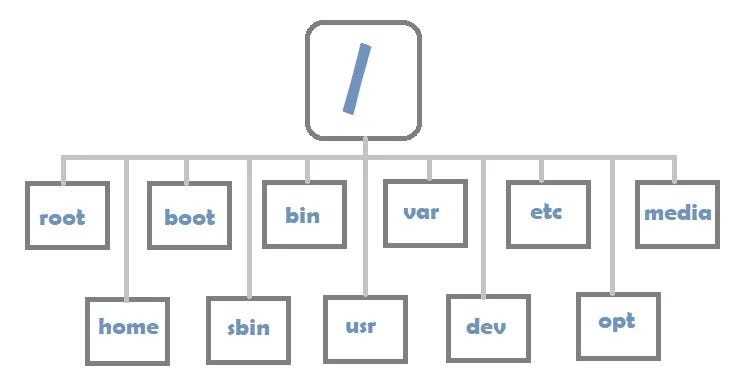
FHS
The Standard Filesystem Hierarchy Standard (FHS 3.0) is a set of standards that define the directory structure and contents in Unix-like operating systems. It tells the system where to find files and how to organize them, but it also dictates how they should be named as well as their purpose. The FHS is used by most Linux distributions like Ubuntu, Debian, Fedora, and many others. However, this poses some issues when it comes to running different programs that expect different versions of the same dependencies. Because dependencies are installed in the same location, they can conflict with each other.
Nix Store
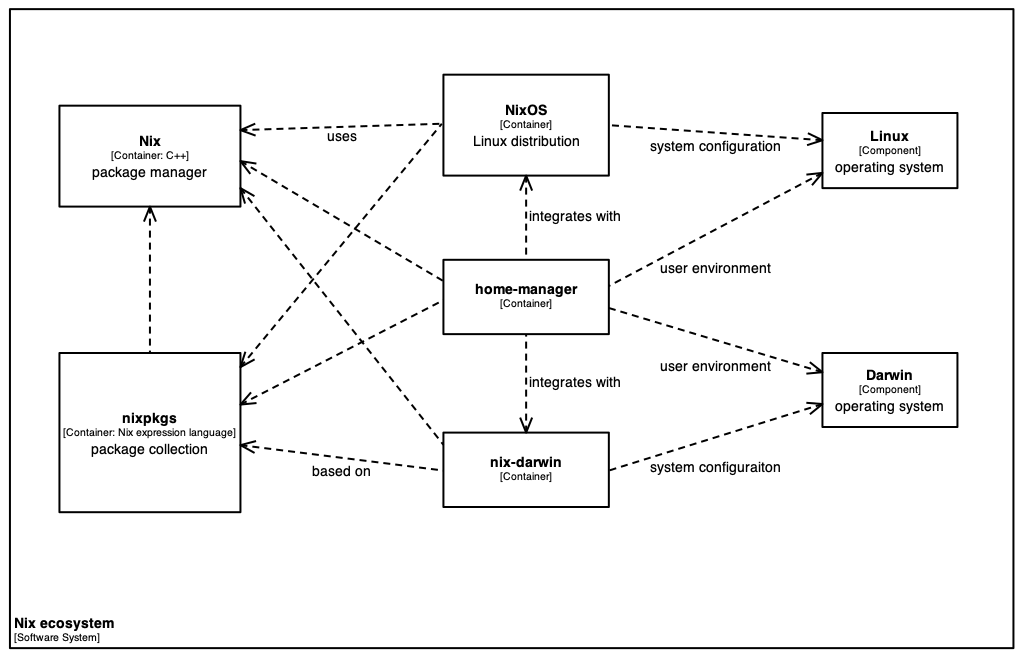
NixOS, on the other hand, uses a different approach to manage its libraries
and dependencies.
NixOS chooses to isolate each package and its dependencies in a unique,
read-only path in the Nix Store, for example:
/nix/store/h9y2...-openssl-3.0.7/lib/.
Because of this isolation, NixOS does not possess a global /lib
or /usr/lib directory where libraries are installed.
This means that when a binary is compiled on another distribution,
it expects to find its dependencies in the standard locations defined
by the FHS, which are not present on NixOS.
This system also causes many dependencies to be duplicated in the Nix Store,
which can lead to larger disk usage compared to other distributions.
How the Linux Kernel Locates the Dynamic Interpreter
To see how this missing FHS layout causes binaries to crash, we need to look at how the Linux kernel actually executes a dynamically linked program.
When we run a dynamically linked program, the Linux kernel does not execute it
right away; instead, it first reads the binary’s Executable and Linkable Format (ELF) header.
Inside these headers, we can find the absolute path to the dynamic linker
and loader, usually something like /lib64/ld-linux-x86-64.so.2
on 64-bit systems.
The kernel uses this path and attempts to load the dynamic linker into memory.
But because NixOS is not FHS-compliant, this path is normally missing.
If the kernel cannot find this loader, execution fails immediately with the
“required file not found” error we saw earlier.
However, if a compatibility layer is active (providing the loader link)
but the standard library directories are missing, the loader starts
but fails to locate dependencies like libselinux.so.1,
leading to a library load crash:
|
|
This explains the dynamic library loading error we encountered.
Solutions to Run Standard Linux Binaries on NixOS
Fortunately for us NixOS provides several ways to handle these compatibility issues depending on your needs:
patchelfdirectly modifies the binary’s ELF headers to point to Nix Store paths.nix-ldsets up a dynamic shim so unpatched binaries can locate libraries on the fly.steam-runcreates a temporary FHS container around the binary using Linux namespaces.
In this section, we will explore some of the most common solutions to run standard Linux binaries on NixOS and analyze their pros and cons.
Solution 1: Modifying the Binary (Static Patching with patchelf)
The first solution is to modify the pre-compiled binary directly to make it
compatible with NixOS.
Since the reason for the crash is the hardcoded FHS paths inside the binary,
we can simply rewrite them.
The NixOS community has created a tool called patchelf for this purpose.
By using patchelf, we can modify the ELF headers of our ls_ubuntu binary.
In order to do that, we need to perform two operations.
First, we change the dynamic interpreter path to point to a valid dynamic
linker in the Nix Store.
graph LR
    subgraph Original ["Original Binary"]
        A["PT_INTERP: /lib64/ld-linux-x86-64.so.2<br>(Missing FHS Loader)"]
    end

    subgraph Patched ["Patched Binary (patchelf)"]
        B["PT_INTERP: /nix/store/...-glibc/lib/ld.so"]
        C["RUNPATH: /nix/store/...-libselinux/lib"]
    end

    A == "patchelf" ==> B
    B --> D["Nix Store Glibc Loader"]
    C --> E["Nix Store Libraries"]
To find the exact path of the dynamic linker on your system,
you can query Nix for the store path of the glibc package.
Running the following command will print the directory of the active glibc
package without creating a local build link:
|
|
This command will output a path like
/nix/store/km4g87jxsqxvcq344ncyb8h1i6f3cqxh-glibc-2.40-218.
However, the path to the dynamic linker is not the same as the path
to the glibc package.
The dynamic linker is located in the lib subdirectory of the glibc
package, so we need to append /lib/ld-linux-x86-64.so.2 to the path
we obtained from the previous command.
We can then use patchelf to modify the binary’s ELF headers
to point to this new dynamic linker path.
The command looks like this:
|
|
Now, when we try to run the binary again, we get a different error message:
|
|
This error message indicates that the binary is now able to find the dynamic linker, but it still cannot find the required shared libraries. This is because the binary is still looking for libraries in the standard FHS locations, which do not exist on NixOS.
In order to fix this, we can use patchelf again to modify the binary’s ELF
headers to include the correct library paths.
We can do this by using the --set-rpath option to specify the path
to the libraries in the Nix Store.
We can find the path to the required libraries by using the nix-build command.
For example, to find the path to libselinux.so.1, we can run:
|
|
We can then use the output of this command to set the rpath of the binary
using patchelf:
|
|
We can repeat this process for any other required libraries.
In our case, libselinux was the only missing dependency.
We can then try to run the binary again.
|
|
As we can see, there are multiple pros and cons to this approach. The main advantage is that it allows us to run the binary without having to install any additional packages or modify the system configuration. However, it can be time-consuming and prone to errors, especially if the binary has many dependencies. Additionally, if the binary is updated or recompiled, we will need to repeat this process to ensure compatibility with NixOS.
Solution 2: Adapting the NixOS Environment (Dynamic Linker Shim with nix-ld)
Instead of modifying the binary, we can also adapt our NixOS environment
to make it compatible with the binary’s requirements.
In order to do that, we use a tool named nix-ld.
This tool acts like a middleman by creating a standard
/lib64/ld-linux-x86-64.so.2 interpreter on the host system.
As a result, when executing a generic binary, the kernel will be able
to find the dynamic linker.
By intercepting the execution of the binary, nix-ld reads the binary’s
requirements and dynamically resolves the dependencies using a pre-configured
list of libraries.
graph TD
    A["Unpatched Binary"] -- "Executes /lib64/ld-linux-x86-64.so.2" --> B["nix-ld Shim Loader"]
    B -- "Reads programs.nix-ld.libraries" --> C["nix-ld Runtime Resolver"]
    C --> D["Nix Store Glibc"]
    C --> E["Nix Store libselinux"]
To enable nix-ld, you must add the following lines to your configuration
file:
|
|
Once nix-ld is enabled, the dynamic linker will automatically find the required libraries at runtime
and allow unpatched binaries to run without modification.
|
|
This approach is more flexible and can handle a wider range of binaries,
but it requires more setup and configuration compared to the first solution.
However, once configured, it can be used to run multiple binaries without
having to modify each one individually.
This approach also allows for easier use of developer tools that download
packages during runtime, such as IDE extensions.
For more details on packaging pre-compiled binaries, see the NixOS Wiki packaging guide and real-world feedback in Pierre Zemb’s engineering report.
However, it will only resolve dependencies that you have explicitly declared
in your NixOS configuration.
If a binary requires a library that is not in the nix-ld list,
the execution will still fail.
Furthermore, this approach slightly degrades the strict reproducibility of the
system, since the execution of the binary depends on the list of libraries
configured system-wide on the host.
For example, a binary that runs perfectly on your machine might fail on
another system that has a different list of libraries declared for nix-ld.
Solution 3: FHS Emulation via Namespaces (Isolation with steam-run)
The third approach is to run the binary inside a compatibility container
using Linux namespaces.
Instead of modifying the binary or the host OS, we create a temporary,
isolated virtual environment.
Inside this virtual environment, standard FHS directories like /lib
and /usr/lib are created and populated.
To the binary, the environment looks like a standard Linux distribution,
while the host system remains untouched.
graph TD
    subgraph Host ["Host System (NixOS Clean)"]
        HostNix["/nix/store/..."]
    end

    subgraph Sandbox ["Isolated FHS Namespace (steam-run)"]
        VirtualLib["/lib64 ---> Points to Nix Store Glibc"]
        VirtualUsrLib["/usr/lib ---> Points to Nix Store Libs"]
        Binary["Unpatched Binary (ls_ubuntu)"]
    end

    Binary --> VirtualLib
    VirtualLib --> HostNix
On NixOS, the easiest way to use this method is through steam-run.
steam-run is a utility that runs any command inside a pre-configured FHS
environment.
Since it includes many common libraries, running our unpatched binary through
steam-run works immediately:
|
|
For developers who need a custom environment, NixOS provides buildFHSUserEnv.
This utility allows you to declare a custom FHS environment in a Nix expression,
specifying only the libraries your application needs.
This sandboxing approach has unique trade-offs.
On the positive side, it requires no modifications to the host system
or the binary, making it extremely robust.
It is the ideal solution for complex proprietary software, games, and
packaging formats like Flatpak and AppImage.
On the negative side, executing programs inside a sandbox adds a small
overhead.
It can also isolate the program too much, making it difficult to interact
with files or services on the host machine.
Choosing the Right Solution
To help you decide which method to use, the following table summarizes the three solutions along with their pros, cons, and primary use cases:
| Solution | Concept | Pros | Cons | Best Suited For |
|---|---|---|---|---|
patchelf |
Rewrites ELF headers to point to Nix Store paths | • Self-contained binary • No host OS modifications needed |
• Manual dependency tracking • Tied to specific Nix store hashes |
Distributing pre-compiled packages |
nix-ld |
Adds a dynamic interpreter shim on the host to resolve libraries | • Transparently runs unpatched binaries • Great for dynamic dev tools (IDEs) |
• Breaks strict system reproducibility • Requires declaring libraries in host config |
Local development & quick testing |
steam-run |
Runs the binary inside an isolated FHS mount namespace | • Zero modifications to binary or host OS • Extremely robust for large software |
• Small sandboxing overhead • Can isolate binary from host services |
Complex proprietary software & games |
Each approach represents a different trade-off between reproducibility,
convenience, and isolation.
If you are developing a package for Nixpkgs, static patching with patchelf is
the standard and most reliable method.
If you are a developer who frequently runs pre-compiled scripts or third-party IDE
extensions, enabling nix-ld system-wide will save you the most time.
Finally, if you need to run large, complex executables without modifying your
host or the binary, using a namespace tool like steam-run is the safest
choice.
Conclusion
NixOS breaks standard Linux binaries by design—without /lib64 or /usr/lib, dynamic linking fails. But as we saw, you don’t need to rebuild everything from source to make things work.
Whether you patch the ELF headers with patchelf, set up nix-ld for daily dev tools, or run binaries inside an FHS namespace with steam-run, each tool solves the FHS mismatch in a different way. Knowing these three approaches gives you enough flexibility to run almost any pre-compiled Linux binary on NixOS.
In a way, this is where Linux is heading anyway: with containers, Flatpak, and modern compiled languages, the idea of relying on shared system libraries in /lib64 is slowly becoming a thing of the past.
Useful Links & References
- Filesystem Hierarchy Standard (FHS 3.0) Specification - Official Linux Foundation specification for FHS directory structures.
- NixOS Wiki - Packaging Existing Binaries - Official community guide for running and packaging pre-compiled executables.
- NixOS Discourse - Recommended Way of Making Generic Binaries Work - Community thread discussing pragmatic approaches for dynamic executables.
- Three Years of Nix and NixOS: The Good, the Bad, and the Ugly - Real-world experience report by Staff Engineer Pierre Zemb.
- Composing FHS-compatible chroot environments in NixOS - Historical article by Sander van der Burg introducing FHS isolation techniques.
- NixOS patchelf GitHub Repository - Source code and documentation for
patchelf. - NixOS Search - steam-run options - Configuration options and details for
steam-run. - nix-community nix-ld GitHub Repository - Dynamic linker shim project for NixOS.